ADO.NET Accelerator
Reduce more than 50% ADO.NET code from your SQL database applications
Start using the Free ADO.NET Accelerator or the Commercial ADO.NET Accelerator version to stop writing repetitive ADO.NET code.
ADO.NET Accelerator benefits:
- It's FREE - You can use the FREE ADO.NET Accelerator version to save time when you need to write ADO.NET code. Supported databases: Microsoft SQL Server, Oracle, Access and any other database that supports OleDb.
- Reduce development time - Eliminate most of the ADO.NET code that you need to write to execute a SQL query against a database.
- Reduce development cost - Create data access code in just a fraction of the original time.
- Reduce ADO.NET code to the maximum - ADO.NET Accelerator eliminates more than 50% of the ADO.NET code that you need to write to execute a SQL query.
- Reduce errors - Avoid expensive programming errors generating consistent and well structured data access code.
- Small learning curve - All you need to know to start using ADO.NET Accelerator is ADO.NET and SQL. It makes ADO.NET Accelerator a perfect tool for junior developers.
- Create SQL queries without adding strings with SQL code to your source code files - Avoid writing a string containing SQL code in your source code files (cs, vb) to create SQL queries.
ADO.NET Accelerator reduces to the maximum the quantity of ADO.NET code that you need to write to execute a SQL query against a database. ADO.NET Accelerator improves your code quality eliminating unnecessary lines of code, it makes your data access code easier to understand and read. ADO.NET Accelerator speeds up the development of database applications using ADO.NET.
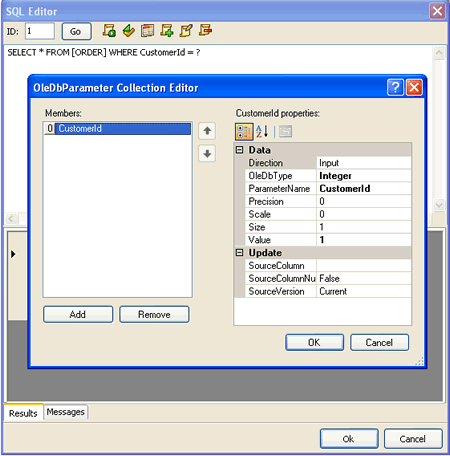
- SQL Editor - Create a SQL query without adding a string containing SQL code in your source code files (cs, vb).
Inserting strings containing SQL code in your source code files is a common practice, however it makes harder to edit and to give format to the SQL query. The SQL Editor allows you to create, edit and execute SQL queries without inserting SQL code in your source code files.
- Data source - ADO.NET Accelerator has a data source control that allows you to link data to controls like DataGrid, GridView, DataList, DetailsView, Repeater and FormView to display information.
The data source control, SqlStoreDataSource, allows you to provide data to data-bound controls in an ASP.NET application. The SqlStoreDataSource control is as easy to use as the SqlDataSource control but without embedding SQL code in the HTML markup, as the SqlDataSource control does. The SqlStoreDataSource control clearly separates the presentation layer from the data access layer without embedding SQL code in the HTML markup.